
Virtual staging for real estate agents
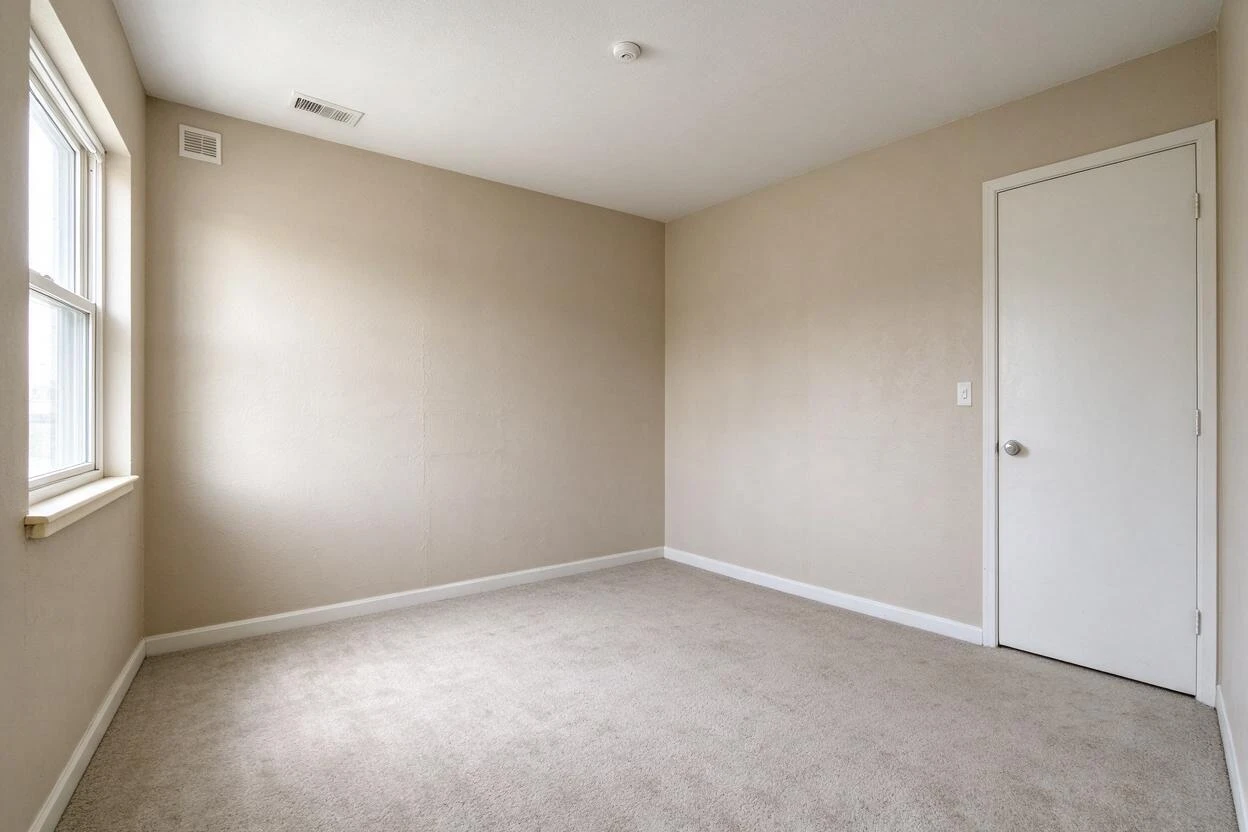
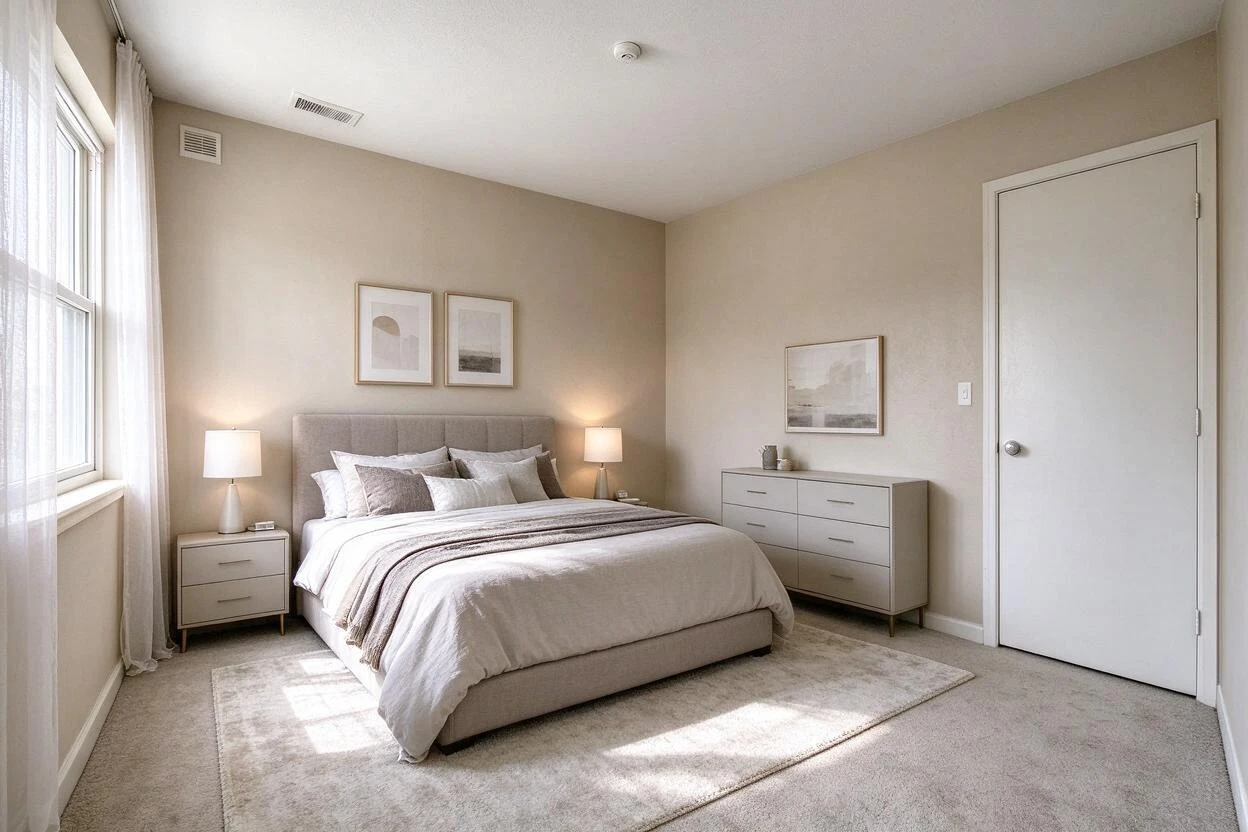
Until someone books a showing, your listing photos are the entire property. Goodesign furnishes an empty room from a single photo of it, leaves the walls, windows and floor exactly as you shot them, and costs about 15 cents an image on the Pro plan — not $7 a render.
No card for the first 5 images · 1 credit = 1 image · cancel anytime
What the numbers actually say
Every figure below is from the National Association of Realtors' 2025 Profile of Home Staging, published 6 May 2025 — 1,266 respondents, margin of error ±2.75 points. We quote the survey's own wording rather than the rounder versions that circulate in vendor blogs, and we keep its limits: these are agents reporting what they observed, not a controlled measure of what staging caused.
29%
of agents said staging lifted the offer by 1–10%
NAR: “Twenty-nine percent of real estate agents reported that staging their sellers' homes received a 1% to 10% increase in the dollar value offered.”
49%
saw staged homes leave the market faster
NAR: 30% observed a slight decrease in time on market, 19% a significant one.
83%
of buyers' agents say staging helps buyers picture the home
NAR: staging “made it easier for a buyer to envision the property as their future home.”
21%
of sellers' agents stage every listing
NAR: 21% stage all homes, 10% only the hard-to-sell ones, and 51% don't stage at all — they just recommend decluttering.
Read the last row twice. Half of sellers' agents (51%) do not stage at all — they just recommend decluttering — and only 21% stage every listing. Most of that restraint is money: $1,500 a home is a real bet on a property that may not sell. A $29 month of renders will not replace a stager on a $2m listing; it furnishes the empty ones that would otherwise run with bare rooms.
Source: NAR, 2025 Profile of Home Staging (published 6 May 2025). Figures are the survey's own, not rounded up.
One photo in, one furnished room out
What each route costs a listing agent
Physical staging numbers are NAR's national medians. Tool prices are the published list prices on each vendor's site, checked October 2026 — they change, so verify before you quote a client.
| Route | What it costs | Source |
|---|---|---|
| Full staging service | $1,500 per home (median) | NAR 2025 Profile of Home Staging |
| Agent does the staging | $500 per home (median) | NAR 2025 Profile of Home Staging |
| Per-image AI tools | $7 an image (Apply Design) · $1 an image (VirtualStagingAI) | Vendor pricing pages, October 2026 |
| Goodesign Pro | $29 a month for 200 images — about 15 cents each | /pricing, 1 credit = 1 image |
Ten listings a month at five staged rooms each is fifty images. On a per-image tool at $7 that is $350; here it is inside the $29 Pro plan with 150 renders left over. If you would rather start smaller, Essential is $14 for 30 images.
What your MLS will ask you to disclose
No US MLS rulebook bans virtual staging. They differ on how much they ask of you, and the spread is wider than vendor blogs admit — one board takes a sentence in the remarks, another takes a watermark you cannot remove plus the original photo beside it. The five below are ordered from lightest to heaviest, each read at the board's own source in October 2026. Your own board's rulebook is still the one that governs.
| Board | Region | What it asks for |
|---|---|---|
| Bright MLS | Mid-Atlantic (DC, MD, VA, PA, DE, NJ, WV) | One sentence in both the private and the public remarks. No watermark, no original photo required — the lightest rule we found. |
| CRMLS | Southern California | The words “virtually staged” or “digitally altered” in each staged photo's description, with the unaltered original placed immediately before or after it in the photo set. |
| Stellar MLS | Central Florida | Three at once: the words in the photo description, the virtually-staged checkbox, and public remarks that open “One or more photo(s) was virtually staged.” |
| ARMLS | Arizona | The Flexmls “Digitally Altered” watermark on the image — permanent once applied — with the original uploaded directly before or after it. |
| Canopy MLS | Charlotte NC / SC | The disclosure on the image itself, because captions and remarks alone are explicitly not acceptable, plus the unstaged original immediately before or after. |
Only one state has put this in statute so far: California's AB 723 (Business & Professions Code §10140.8) took effect 1 January 2026 and requires a conspicuous label on or beside every digitally altered listing image, plus access to the unaltered original. Everywhere else the rule is the board's, not the state's — which is why the table above matters more than any single law.
A listing, start to finish
01
Photograph the empty room
One straight-on shot per room, phone camera is fine. Shoot wide enough to include the floor and ceiling — the render keeps the geometry it is given, so a wider frame gives you more room to work with.
02
Pick a style or describe the room
Thirty-one named looks (Japandi, Mid-Century, Warm Minimalist and so on) or a written brief. Match the style to the price band and the buyers you expect, not to your own taste.
03
Download the render, keep the original
The unaltered photo is what most boards want available, and some require it published beside the render. Keep both in the listing folder from the first upload, not after a compliance email.
04
Label before you publish
Apply the caption, checkbox or watermark your board asks for, on every portal — not just the MLS. The label is a two-word fix; skipping it is what turns a marketing decision into a compliance one.
When you should not use this
Half of what makes a page like this worth reading is where it tells you to stop.
- The home is already furnished and neutral. More than half of sellers' agents (51%) do not stage at all — they recommend decluttering instead, and for a home like this that is the right call. A render of an already-furnished room adds nothing but a disclosure obligation.
- The listing is priced wrong. Staging cannot rescue an overpriced property, and a beautiful render on an overpriced home mostly buys you showings that end in silence.
- The problem is structural. A dated kitchen, a cracked wall, a dark basement — the fix is repair or honest description. Board rulebooks forbid renders that add or hide permanent features, and the rare exception still demands a disclaimer watermark with the unaltered photo beside it. Pushing a render into that territory is the one move that gets a listing pulled.
- The buyer pool expects real furniture in person. For some luxury and new-build listings the showing is the product; a render helps the click, not the visit.
Questions agents actually ask
- How many renders does one listing need?
- Look at where agents spend their staging budget: NAR's 2025 survey found sellers' agents stage the living room 91% of the time, the primary bedroom 83%, the dining room 69% and the kitchen 68%. Three to five renders cover the rooms buyers judge. Guest and children's bedrooms were staged least often, at 22% each — skip them.
- Will the render change the room's structure?
- It should not, and the tools you use decide that. Goodesign adds and removes movable furniture and decor; walls, windows, doors, ceilings, floors, fixtures and the view outside stay as photographed. Check every render before you publish it — the same way you would check any edited photo — because you, not the vendor, sign off on the listing.
- Do I have to keep the original photo?
- Most boards say yes, and California requires it outright. CRMLS, ARMLS and Canopy all require the unaltered image in the listing beside the render; Bright asks only for the remarks sentence. Our guide to virtual staging disclosure walks through the board-by-board differences.
- What happens if a buyer arrives and the room is empty?
- They already know, if the label is in place — and that is the point of it. A buyer who books a showing expecting furniture and finds bare floors reads the gap as a broken promise. A buyer who knows the photos were rendered walks in seeing an empty room as an opportunity. The label costs two words and protects the offer you worked to build.
- Is a $29 plan enough for a working agent?
- 200 images a month covers roughly 40 listings at five renders each. If you stage a handful of listings a month, the $14 Essential plan (30 images) is the honest starting point. Both are monthly and cancel anytime, so there is no reason to overbuy before you know your own volume.
- Can I restyle one room in several ways?
- Yes, and it is the cheapest objection-handling you have. The same empty living room in a warm neutral scheme and in a darker, more contemporary one lets a seller see their own taste in it, and lets you test which direction the market responds to before anyone spends money on furniture.
Go deeper
- Do you have to disclose virtual staging?The board-by-board rules, plus the California statute in detail.
- The cheapest way to stage a home for saleThe full cost comparison, including where physical staging still wins.
- Common virtual staging mistakesThe six habits that get listings pulled or offers withdrawn.
- How virtual staging worksThe task page: what goes in, what comes out, what it costs.
Rulebooks and prices checked October 2026. Both change without notice — confirm your board's current text before you publish, and treat this page as a starting point rather than legal advice.
Stage the next one for free
Five images on signup, no card. Photograph an empty room you already have on the market and see whether the render is good enough to publish — that is a ten-minute test, not a subscription decision.